


Key Takeaways
- Real-time alerts in a wearable-driven product need two webhook layers, not one. Incoming webhooks bring provider data into your platform. Outgoing webhooks notify your product when that data is ready. Most teams underestimate the second layer until the first user complaint comes in.
- Open Wearables handles both directions. Incoming webhooks pull data from the providers that support push (Garmin, Strava, Oura among others). Outgoing sync status events are delivered as Svix-signed webhooks plus a Server-Sent Events stream, with an Admin Panel UI for human-facing observation.
- Platform-side sync status is short-lived by design. Teams that need longer audit trails subscribe to the outgoing webhook events and store them in their own database. This is the supported architectural pattern.
- The user-facing alert layer (HRV drop, sleep deterioration, training overload) sits in your product, not in Open Wearables. Momentum builds that layer as a scoped engagement on top of the managed infrastructure.
Is Your HealthTech Product Built for Success in Digital Health?
.avif)
Introduction
Real-time alerts are the feature that turns a health product from a dashboard into something users trust. A push notification that fires within a minute of a meaningful biometric change feels like the product is paying attention. The same alert delivered six hours late feels broken.
The infrastructure to deliver that one-minute feeling is more complicated than it looks. Wearable data does not arrive in your backend on a clean schedule. Different providers push at different speeds, with different payload shapes, through different protocols. Apple HealthKit on iOS has a minimum sync cadence that is not negotiable. Garmin batches webhook payloads when multiple data types arrive close together. Webhook deliveries fail and retry. Some users do not sync their device for days.
This post walks through the two webhook layers that make real-time alerts work in practice. It is written for engineering leads building the data pipeline and product owners scoping what is realistic to ship. The worked example anchors on a common case: an HRV drop alert. The same pattern applies to sleep deterioration, recovery readiness, training overload, and most other real-time health alerts.
Open Wearables handles the incoming side (provider to platform) and the outgoing side (platform to your product). Your product handles the rule logic and the user notification. Momentum builds the full stack for clients under managed engagement.
The Real-Time Alert Problem in Healthtech
Teams reaching out to us with a real-time alert requirement share one of these use cases:
- Cardiac early warning: an HRV pattern that suggests atrial fibrillation, dehydration, or acute infection
- Training overload: recovery readiness dropping below a per-user threshold for several days running
- Sleep disturbance: a sleep score below baseline plus elevated resting heart rate overnight
- Corporate wellness drop-off: a member who has not synced their device or completed activity targets
All four use cases share the same shape. Data lands in your platform. A rule evaluates the data against a baseline or a threshold. If the rule fires, a notification reaches the user (or a clinician, or a coach) inside a freshness window that varies from "this minute" to "by end of day."
The reason this is harder than it looks is that the pipeline has three independent failure modes:
- Provider freshness. The provider has not synced fresh data from the device yet. Whoop syncs in the background. Garmin pings when the watch uploads. Apple HealthKit on iOS has its own background-delivery cadence. You cannot alert on data your platform does not have.
- Platform processing. Data lands but is not yet normalized, scored, or persisted to the query path your alert rule reads from. Race conditions live here.
- Product notification path. The alert rule fires but the push notification fails delivery, hits a do-not-disturb window, or the user has notifications disabled. Logging and observability matter as much as the rule logic.
A real-time alert system that does not address all three of these turns into a feature that is correct in testing and unreliable in production.
Two Webhook Directions
The core architectural decision is where each layer of complexity lives. In a multi-wearables product, there are two distinct webhook flows:
Incoming (provider to your platform). Vendors push notifications when new data is ready. Open Wearables receives, validates, fetches, normalizes, and persists.
Outgoing (your platform to your product). When sync completes, Open Wearables emits an event your product subscribes to. Your product then evaluates alert rules and delivers user-facing notifications.

Most teams that build wearable integrations themselves get the incoming layer working, then assume their product can just poll for new data and react. That works in a demo. In production with a few thousand users, polling either misses alerts or overloads the database. The outgoing webhook layer is what makes the alerting pipeline efficient at scale.
Incoming: How Open Wearables Receives Provider Data
Open Wearables exposes dedicated webhook endpoints for each provider that supports push, including Garmin, Strava, and Oura. Providers that do not push (or that push partially) come through either scheduled polling or SDK-based ingestion. The platform absorbs that distinction so your product reads from one normalized data layer regardless of which provider the data came from.
Each provider has its own variant of webhook semantics, and the platform absorbs the differences. The Garmin webhook handler in Open Wearables is a good example. The file opens with this comment, which is the clearest summary of what makes Garmin webhooks different:
"""Garmin webhook endpoints for receiving push/ping notifications.

Garmin sends data via two webhook types:
- PING: Contains callbackURLs with temporary tokens to fetch data
- PUSH: Contains inline data (activity metadata, wellness summaries)

When multiple backfill requests happen within 5 minutes, Garmin may batch
the webhook responses into a single payload containing data for multiple types.
All 16 data types are handled in both PING and PUSH handlers.
"""Source: backend/app/api/routes/v1/garmin_webhooks.py
Three things this comment captures that any homegrown Garmin webhook handler eventually has to handle: two payload types (PING with a callback URL the platform has to fetch, PUSH with inline data), batching behavior across data types, and 16 distinct data type schemas. Strava and Oura have their own equivalents.
Open Wearables ships these handlers as part of the platform. When a Garmin webhook arrives, the platform deduplicates the event, fetches the actual data (for PING types), normalizes it into the unified schema, persists it, and triggers downstream processing. None of that work shows up in your product code.
Outgoing: How Open Wearables Notifies Your Product
This is the layer most teams forget to plan for.
Once Open Wearables has persisted new data for a user, it emits a sync status event. The event is available through three channels:
- Outgoing webhook. The platform delivers terminal sync events (
sync.completed,sync.failed,sync.cancelled) to a webhook endpoint your product registers. Delivery uses Svix, which handles retries, signature verification, and replay. - Server-Sent Events stream. A persistent HTTP connection your product opens to stream all sync events (including non-terminal stages like
fetchingandprocessing) for live dashboards or operational tooling. - Admin Panel. A human-facing view in the Open Wearables developer dashboard showing per-user sync history and a global syncs tab.
The webhook payload follows a documented schema:
{
  "event_id": "evt_01HZ...",
  "run_id": "pull_garmin_user42_1730000000",
  "user_id": "user42",
  "provider": "garmin",
  "source": "pull",
  "stage": "completed",
  "status": "success",
  "message": null,
  "progress": 1.0,
  "items_processed": 50,
  "items_total": 50,
  "error": null,
  "metadata": {},
  "started_at": "2026-05-13T10:15:00Z",
  "ended_at": "2026-05-13T10:15:34Z",
  "timestamp": "2026-05-13T10:15:34Z"
}Source: openwearables.io sync status documentation
The source field tells you how the data arrived (pull, webhook, sdk, backfill, xml_import), and stage captures the lifecycle (queued, started, fetching, processing, saving, completed, failed, cancelled).
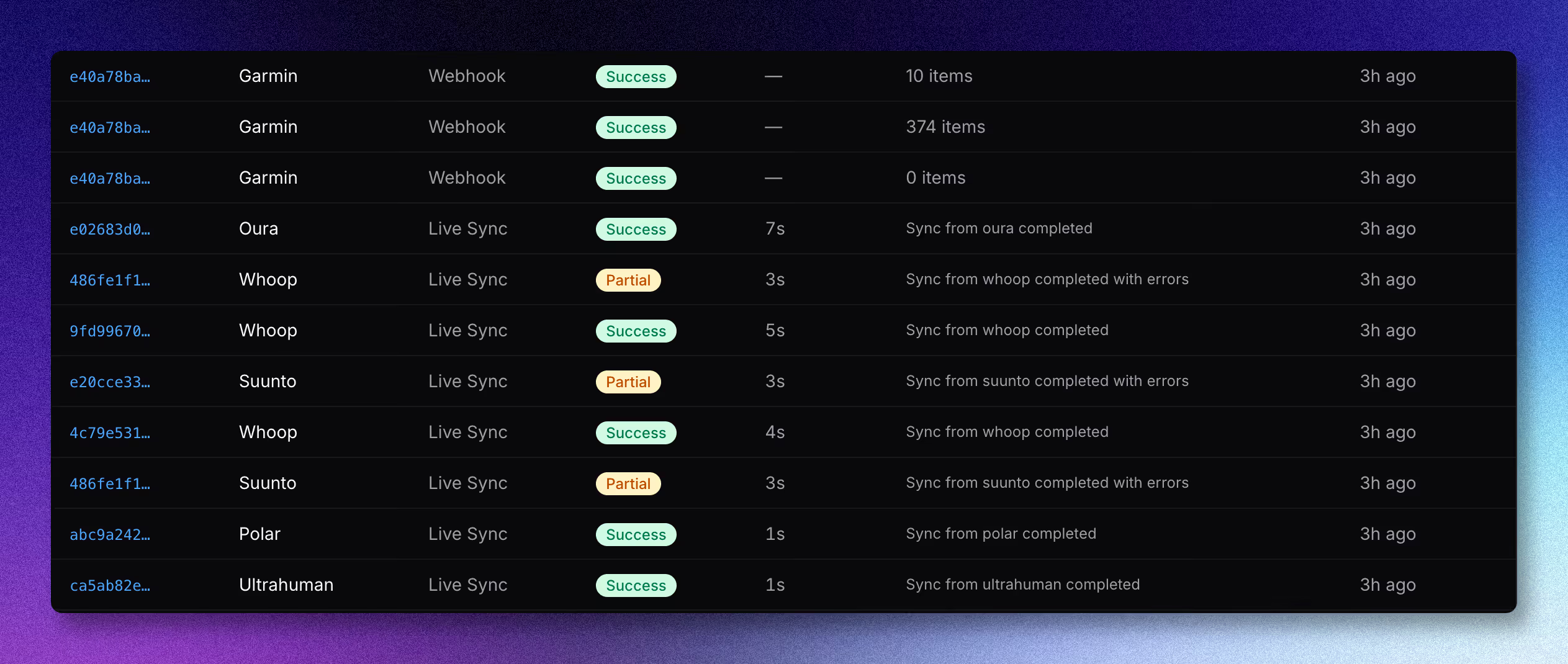
A critical operational detail: sync status in the platform itself is intentionally short-lived (Redis-backed, with a rolling retention window). If your product needs an audit trail beyond that window (which most healthcare-adjacent products do, for compliance and debugging), the supported pattern is to subscribe to the outgoing webhook events and store them in your own database.
This is the architectural reason the outgoing webhook layer matters. The Admin Panel is convenient for human debugging. The SSE stream is the right pick for live operational dashboards. The outgoing webhooks are the long-term audit trail and the trigger surface your alert pipeline reacts to.
A Worked Example: An HRV Drop Alert End to End
Take a concrete case. A digital health product wants to alert a user when their HRV drops twenty percent below their fourteen-day rolling baseline. This is a well-studied signal for training overload, acute illness, or autonomic stress.
Here is what happens when the alert fires correctly:
Step 1: The user's Garmin watch records overnight HRV. When the watch syncs with Garmin Connect (usually within minutes of being put down), Garmin's backend has the new HRV reading, including RMSSD as part of the daily wellness summary that Open Wearables normalizes into its unified schema.
Step 2: Garmin pings Open Wearables. Open Wearables receives the PING webhook with a callback URL. The platform fetches the data, normalizes the HRV reading into the unified schema (including RMSSD), and persists it. The sync status moves through queued, started, fetching, processing, saving, and finally completed.
Step 3: Open Wearables emits a sync.completed outgoing webhook. Your product's webhook receiver gets a Svix-signed POST with the payload shape shown above, including provider: garmin, status: success, and items_processed: 50 (or whatever count of data points the sync brought in).
Step 4: Your product reads the latest HRV. Your webhook receiver calls the Open Wearables REST API to read the user's most recent HRV reading plus the fourteen-day rolling mean. The math is straightforward: compute current vs baseline delta as a percentage.
Step 5: The alert rule evaluates. If delta is below the threshold and the user is not in a do-not-disturb window, fire a push notification: "Your overnight HRV is meaningfully lower than your usual. Consider lighter training today." Log the alert decision, including the input values, to your audit table.
A minimal webhook receiver in your product might look like this:
from fastapi import APIRouter, Header, Request, HTTPException
from svix.webhooks import Webhook, WebhookVerificationError

router = APIRouter()
WEBHOOK_SECRET = settings.ow_webhook_secret


@router.post("/webhooks/open-wearables")
async def receive_sync_event(
    request: Request,
    svix_id: str = Header(...),
    svix_timestamp: str = Header(...),
    svix_signature: str = Header(...),
):
    payload = await request.body()
    try:
        wh = Webhook(WEBHOOK_SECRET)
        event = wh.verify(payload, {
            "svix-id": svix_id,
            "svix-timestamp": svix_timestamp,
            "svix-signature": svix_signature,
        })
    except WebhookVerificationError:
        raise HTTPException(status_code=401, detail="Invalid signature")

    if event["stage"] == "completed" and event["status"] == "success":
        await evaluate_hrv_alert.delay(
            user_id=event["user_id"],
            provider=event["provider"],
            run_id=event["run_id"],
        )

return {"received": True}Two things this snippet does that matter in production. Signature verification with the Svix SDK rejects forged webhook calls (Svix-signed payloads are non-trivial to forge). And the actual alert evaluation runs as an async task, not inline in the webhook handler, so a slow rule does not block webhook acknowledgment and trigger Svix retries.
The rule evaluation itself reads from the Open Wearables REST API, applies the threshold, and triggers the push notification. That logic lives in your product, calibrated to your population and product behavior.
The Apple HealthKit Reality Check
For users whose primary data source is Apple Health on iOS, the word "real-time" needs an asterisk.
Apple HealthKit on iOS does not push to a backend. The Open Wearables iOS SDK uses HealthKit's ObserveQuery plus background delivery, which Apple gates at a minimum cadence in the range of fifteen minutes to one hour. Configuring the SDK for shorter intervals does not override this. The cadence is set by iOS, not by your code.
What this means in practice:
- For Garmin, Oura, or Whoop users, an alert can fire inside one minute of the data being generated on the device, end to end.
- For Apple Health users, the lower bound is roughly fifteen minutes plus the data pipeline.
- Designing alert UX without knowing which data source the user is on leads to inconsistent product behavior.
The right pattern is to surface the data source to your alert logic and adjust the user-facing language. An overnight HRV alert that fires when the user wakes up is fine on Apple Health cadence. An alert designed to interrupt a workout for a heart rate event will not work reliably from Apple Health alone.
Where Complexity Hides
A few places where homegrown alert pipelines accumulate bugs in production:
Idempotency. Svix and most webhook delivery systems retry on failure. Your webhook receiver and alert logic both need to be idempotent on event_id or run_id. Without this, users get the same alert twice, sometimes more.
Race conditions in multi-type syncs. A single sync run can include workouts, sleep, and HRV. Different alert rules read different subsets. If your evaluation kicks off the moment one type finishes processing, it can read stale data for the other types. The clean pattern is to evaluate on stage: completed for the full run, not on partial signals.
Alert deduplication and suppression windows. A user whose HRV is below baseline for three nights running should get one alert, not three. Suppression logic is product code, not infrastructure code, and most teams underestimate how much state it accumulates.
Failed delivery observability. When a push notification fails (token expired, app uninstalled, do-not-disturb), the alert pipeline needs to know. Otherwise the audit table shows alerts that were fired but never delivered. This is especially important for clinically-adjacent alerts where missed delivery has real consequences.
Platform-side sync status is short-lived by design. If your only persistence of sync status is the Open Wearables Admin Panel, you have a short audit horizon by default. Compliance reviews and incident investigations need longer. Subscribe to the outgoing webhook events and persist them in your own database from day one.
These are the failure modes a managed engagement absorbs. They are also the reason a careful production-grade alert pipeline is more involved than the demo version suggests.
What Momentum Adds On Top of Open Wearables
When you engage Momentum to build a real-time alert product on top of Open Wearables, the engagement covers:
The incoming webhook pipeline, day one. Open Wearables handles provider webhooks across Garmin, Strava, Oura, and the broader provider set already in the platform. No webhook-handler code on your side.
Outgoing webhook receiver and persistence layer. We build the receiver inside your product, persist events to your audit store, and wire the alert rule engine to consume them.
Alert rule design and threshold modeling. Anna Zych's data science team builds the threshold logic per cohort. A twenty-percent HRV drop means something different for a twenty-five-year-old athlete than a sixty-year-old cardiac rehab patient. Generic thresholds produce alert fatigue. Cohort-calibrated thresholds produce alerts users trust.
Production observability. Long-term sync status persistence beyond the platform's built-in retention window. Alert delivery audit trails. Push notification failure handling. Dashboards your operations team can read.
HIPAA-compliant push notification routing for clients in regulated environments. BAA signing, encrypted notification payloads, audit log retention to the level your compliance posture requires.
Ongoing maintenance under SLA. Provider webhook schema changes, Svix configuration updates, alert rule iteration as data accumulates. We handle the drift so your team focuses on the product features that depend on the alert layer working.
Momentum delivers this as a managed engagement: the platform maintained on our side, the alert layer built into your product, with maintenance under SLA.
Talk to Momentum
If you are building a wearable-driven product where real-time alerts are part of the value, Momentum runs this for client teams in health, wellness, longevity, and clinical software.
Two engagement shapes:
Managed Open Wearables with alert layer. We deploy and operate Open Wearables on your infrastructure, plus build the outgoing webhook receiver, alert rule engine, and notification routing in your product. Fixed-cost setup plus a maintenance retainer. No per-user fees.
Custom wearable software development. When the alert layer is part of a larger product build (AI coach reacting to alerts, clinical workflow on top of alerts, EHR integration), we build the whole thing. Open Wearables infrastructure is included in scope.
Both start with a Discovery Workshop, and you leave with a scope and a timeline.
Frequently Asked Questions

.png)

%201.png)
.avif)
.avif)
.png)
