

.avif)

Key Takeaways
- Apple Health data lives on the device with no cloud API, so without a native iOS layer your product is blind to the largest wearable ecosystem in digital health.
- Mobile-first is a data architecture decision, not a UX preference: the native app is your gateway to HealthKit, Garmin, and Google Health Connect SDKs.
- Most teams estimate wearable integration at 2-3 weeks but ship 3-6 months later because each vendor uses different auth, schemas, and sync models.
- Data inconsistency across devices erodes user trust fast, Oura and Fitbit calculate sleep scores with completely different algorithms and no shared standard.
- Unified open-source integration layers compress months of OAuth flows and normalization work into days, without vendor lock-in or per-user fees.
Is Your HealthTech Product Built for Success in Digital Health?
.avif)
In 2026, wearables have quietly become the heartbeat of the digital health revolution. Smartwatches and rings now track every beat, step, and breath. From Apple Watch and Garmin to Oura and Fitbit, users generate gigabytes of personal health data every day: heart rate, HRV, oxygen levels, sleep stages, stress patterns.
Most health apps barely touch it.
They either rely on manual input, scrape partial data through APIs, or cannot access Apple Health at all because they skipped one crucial principle: mobile-first architecture.
This article explains why mobile-first architecture is the foundation of any serious health platform, why so many teams struggle to get wearable integration right, and how modern approaches are compressing months of work into days.
The Data You Want Lives on the Phone
The world’s most valuable health data from Apple Health does not sit on a server you can query. It lives on your user’s iPhone, encrypted, local, and private.
Apple designed HealthKit so that data never leaves the device unless the user explicitly allows it.
That means:
- You cannot pull Apple Health data from a cloud API
- You must have a native iOS app installed on the user’s device
- You need explicit permissions for every data type
- Syncing and processing happen locally before being sent to your backend
Without a native app, your product is effectively blind to Apple users, a group that represents the largest and most data-rich wearable ecosystem in the world.
Even if your business is built around a web platform or coaching dashboard, you still need a small mobile bridge app. This bridge authenticates the user, gathers data from Apple HealthKit, and transmits it securely to your backend for analysis.
Without it, you are disconnected from the pulse of your audience in the most literal sense.
Mobile-First Is About Architecture, Not Just UX
For years, startups have treated "mobile-first" as a UX trend: beautiful interfaces, smooth animations, intuitive navigation. But in healthtech, mobile-first means something much deeper: data architecture.
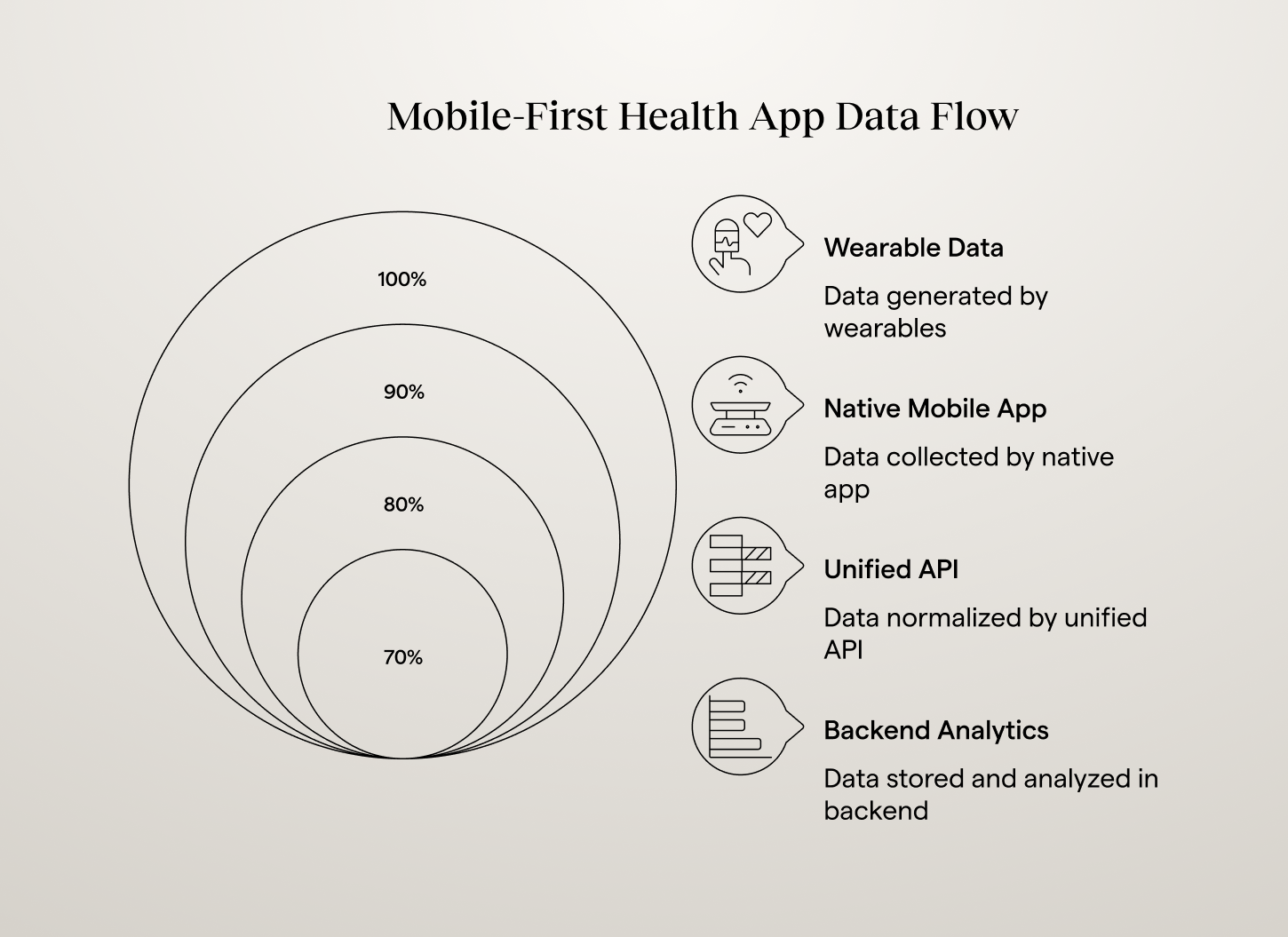
A modern health app's data flow looks like this: wearables feed into a native app, which connects to a unified API or backend, which powers AI engines and dashboards. That native app is more than another interface. It is your data gateway. It connects to the user's sensors through SDKs like Apple HealthKit, Garmin Health, or Google Health Connect. It handles authentication, permissions, and data sync. It ensures that the data entering your system is accurate, compliant, and timely.
Your backend, no matter how advanced, cannot do any of that on its own. Without a mobile app, your backend has nothing to talk to. The most valuable health data will never reach your servers. You cannot measure HRV, detect recovery patterns, or analyze sleep quality without it.
The equation is simple:
No native app means no wearable data, no personalization, no long-term user engagement.
Apple’s Privacy Rules Make Mobile the Only Option
Apple's health ecosystem is built around privacy-by-design. Users trust it because of this, but it also locks developers out unless they play by Apple's rules.
In practice, that means you cannot request or process HealthKit data on your backend servers. You must request permission on the device itself. Data cannot be shared between apps without user consent. All data is encrypted at rest and in transit within iOS. Developers are responsible for building compliant sync workflows. Apple does not provide exceptions. There is no hidden API or workaround.
From a compliance perspective, this is a good thing. It keeps your product aligned with privacy regulations like GDPR and HIPAA. From a product perspective, it forces you to commit to a mobile strategy early or risk being locked out of the most trusted data ecosystem in digital health.
The Integration Struggle: Why Most Teams Get Stuck
Understanding why native access matters is one thing. Actually implementing wearable integration is where most teams hit a wall. When product teams first scope the work, they estimate 2-3 weeks. In practice, it takes closer to 3-6 months for a production-ready system that handles multiple devices reliably.
The complexity hides in layers that only reveal themselves during implementation.
%20(1)%201.png)
Different Integration Models Across Platforms
Apple HealthKit requires a native mobile app with local data access and no backend API. Garmin Health API pushes data via webhooks with OAuth authentication. Fitbit Web API and Oura Cloud API use REST APIs with different token refresh schedules, ranging from 8 hours for Fitbit to 60 days for Garmin. Whoop API has beta documentation with frequent changes. Strava API focuses on activity data with limited biometric access. Each vendor is essentially its own mini-project.
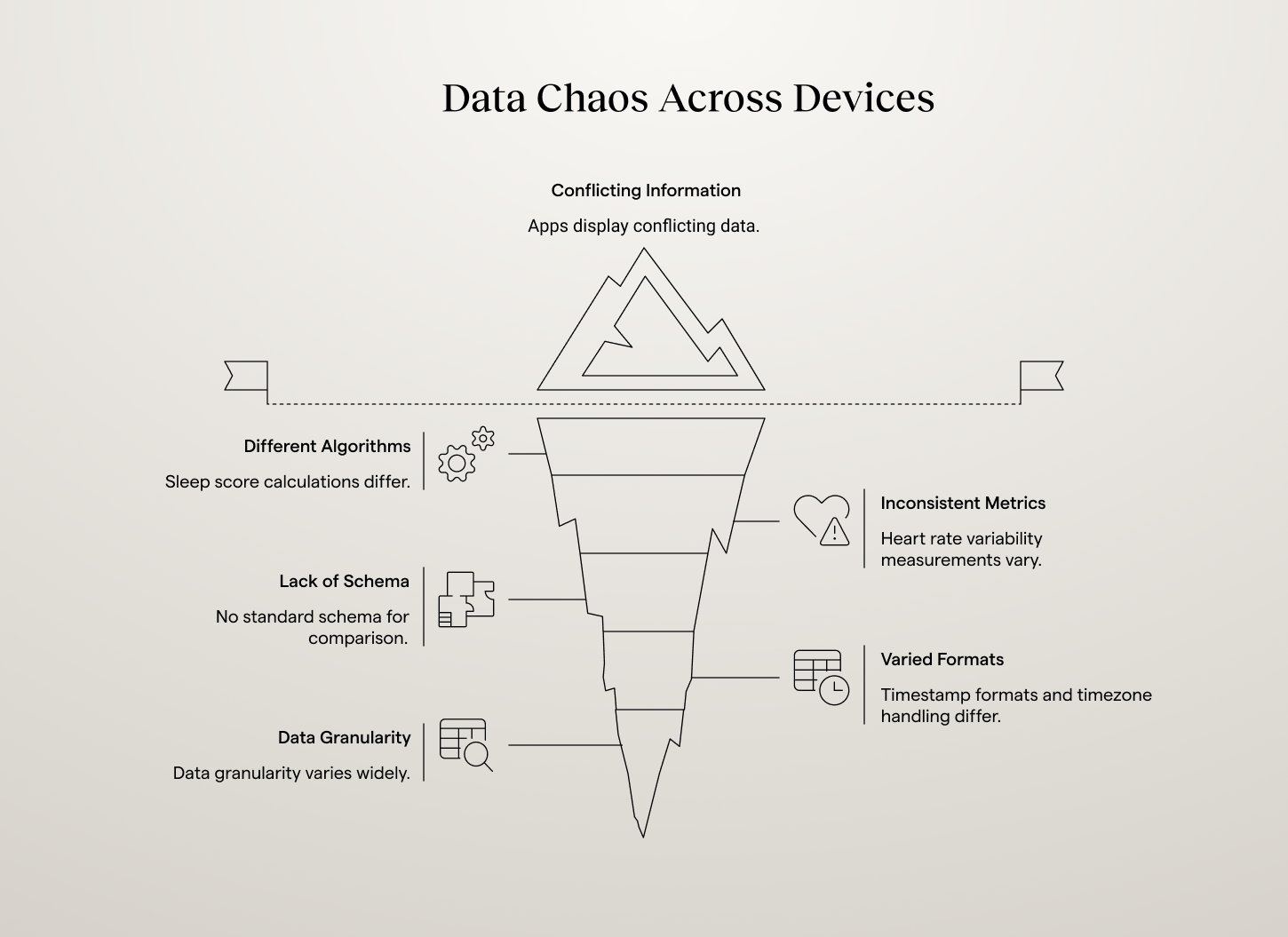
Data Chaos Across Devices
"Sleep score" calculations differ completely between Oura, Fitbit, and Garmin. Heart rate variability measurements use different algorithms per manufacturer. No standard schema exists for comparing metrics across brands. Timestamp formats, timezone handling, and data granularity vary widely. Without normalization, apps display conflicting information that erodes user trust. A user's recovery score from Whoop might say "red" while Oura shows "good," based on the same underlying physiology but different calculation methods.
Why Traditional API Approaches Fail
Most teams try to solve wearable integration the same way they would connect to a payments API or social media platform. This fails because wearables are fundamentally different. Payment APIs handle discrete transactions, but wearables generate continuous streams of biometric data that need temporal alignment, deduplication, and aggregation. Traditional REST patterns do not fit the continuous data model that health metrics require.
Apple's local-only data model breaks cloud-first development patterns. Health data compliance requirements add HIPAA, GDPR, and audit logging demands that generic API approaches never account for. And users expect wearable data to appear in real-time, show meaningful insights, and work seamlessly across devices. Meeting these expectations requires sophisticated data processing pipelines, not just API connectivity.
The Business Cost of Getting Integration Wrong
Technical complexity translates directly to business impact. Projects that should take 6-week sprints ship 6 months later. Instead of supporting the devices users actually own, apps pick one or two "easier" integrations. Users with Garmin watches but Fitbit-only apps simply do not get the experience they expect.
Poor data quality emerges when teams rush to ship without proper normalization. Heart rate from Apple Watch does not align with HRV from Oura, making long-term trends unreliable and undermining the app's credibility. Technical debt accumulates as quick fixes pile up, and teams find themselves maintaining integrations instead of building features users actually want.
The result is mobile health apps that feel incomplete, users who do not get personalized experiences, and development teams stuck in maintenance cycles instead of innovation.
Why Native Access Is a Competitive Advantage
While some see Apple's restrictions as a barrier, visionary companies see them as a moat. If you are one of the few startups with true native access, you can deliver deeper personalization using HRV, sleep, and stress data to adapt recommendations in real time. You can build continuous engagement by automatically detecting fatigue, overtraining, or recovery patterns. You can power predictive analytics by combining daily wearable data with contextual signals to anticipate health trends. And you can build trust and transparency by letting users control their data locally and sync it only when they choose.
Meanwhile, competitors that rely on web scrapers or CSV uploads stay stuck in an outdated era of digital health. The most successful wellness, longevity, and performance apps share one thing in common: they own the mobile layer. That is what makes their experience seamless, data-driven, and alive.
{{lead-magnet}}
Web-Only Apps Fall Behind (and Fast)
Many startups still launch with a web-only product, assuming they can add wearables "later." Here is what happens when they try: they discover that Apple Health offers no backend API, they realize Garmin, Fitbit, and Oura each use different schemas, they spend months stitching together inconsistent SDKs, and they burn budget on maintenance instead of insights.
Without a native app, the data they get is incomplete and delayed. They cannot deliver the real-time, personalized experience users expect. Engagement drops, retention tanks, and the team ends up rebuilding from scratch. In the healthtech market, real-time context wins. If your platform does not automatically know that a user slept four hours or that their recovery score just dipped, your insights will always feel generic. And generic does not retain users.
What About Android?
Android's Health Connect is Google's on-device health data repository and the official replacement for the deprecated Google Fit APIs. It provides both local and cloud options, which seems more flexible. But in practice, the same logic applies. Even on Android, the most reliable and permission-compliant way to access wearable data is through a native layer. Fitbit, Whoop, and Strava all require authentication flows that depend on mobile SDKs or in-app OAuth.
While Android gives developers more freedom, you still need a native app to bridge user data securely and efficiently. Mobile-first is not just an Apple thing. It is the new standard across the entire wearable ecosystem.
The Blueprint of a Mobile-First Health Platform
A proper mobile-first health app architecture in 2026 has four core components working together.
The native mobile app handles Apple HealthKit, Google Health Connect, Garmin, and Oura SDKs. It manages authentication, permissions, and background data sync. This is the foundation layer that everything else depends on.
The integration layer normalizes incoming data, removes duplicates, and standardizes metrics. It provides one consistent schema for heart rate, HRV, sleep, activity, and more. Open-source frameworks like Open Wearables handle this automatically, replacing months of custom normalization work.
The backend and analytics layer stores unified data securely, powers dashboards, reports, and AI models, and implements compliance, encryption, and data retention policies.
The frontend or chat layer displays insights to users, coaches, or clinicians and powers notifications or conversational experiences.
This modular architecture allows you to expand easily. Add new wearables, plug in AI analytics, or connect dashboards without rewriting your pipeline.
That's what a proper mobile-first health app architecture looks like in 2026.
How Modern Teams Are Solving Wearable Integration
The most successful mobile health apps no longer build wearable integrations from scratch. Instead, they use unified platforms that handle complexity automatically while preserving control over data and user experience.
Unified integration layers connect to multiple wearables through one consistent API. Instead of managing six different SDKs, teams write against a single interface that outputs normalized, time-aligned data ready for analysis. Open-source solutions provide transparency and customization without vendor lock-in. Developers can inspect data flows, modify processing logic, and maintain full control over sensitive health information.
Mobile-first architectures embrace Apple's device-local model rather than fighting it. Successful teams build lightweight mobile apps that handle permissions and sync, feeding clean data to web dashboards and AI systems. AI-ready data pipelines output structured, consistent data that machine learning models can consume immediately, letting teams focus on user value rather than data wrangling.
Teams that choose unified, open-source platforms gain advantages beyond faster development. Full data control and transparency are crucial for healthcare applications where data governance impacts user trust and regulatory compliance. HIPAA, GDPR, and other health data regulations require audit trails and clear governance policies. When you can inspect and modify every aspect of your data processing pipeline, compliance verification becomes a technical exercise rather than a leap of faith. And no vendor lock-in means your health data infrastructure does not depend on external companies' pricing changes or strategic pivots.
For specific examples of what teams build once integration complexity is solved, see 8 real-world wearable data integration use cases. From individual founders shipping faster to AI-native teams at insurers and telehealth platforms.
The ROI of Mobile-First Integration
Going mobile-first may feel like extra work upfront, but it pays off quickly.
1. Faster Data Access
Once permissions are granted, wearable data streams in continuously with no manual syncs needed.
2. Higher User Engagement
Native experiences keep users returning. Notifications, widgets, and on-device insights boost retention dramatically.
3. More Accurate Insights
Native SDKs provide high-resolution data, second-by-second metrics instead of daily averages.
4. Easier Compliance
You operate within Apple and Google’s approved frameworks, minimizing legal risk.
5. Better Market Positioning
Mobile-first products feel more premium. Investors, partners, and users recognize it instantly.
Health apps that own their native layer do not just collect data. They build trust and loyalty. They become daily companions, not occasional tools.
Building for the Future of Mobile Health
Wearable integration challenges will not disappear. They will evolve. New health monitoring devices launch constantly. APIs change frequently. User expectations for real-time, personalized health insights continue rising.
The teams that succeed long-term design for multiple devices from day one, because users rarely stick with one wearable brand forever. They plan mobile-first architecture early, since Apple Health integration requires native components that are expensive to retrofit. They invest in data quality over quantity, because clean, reliable data from three devices beats noisy data from ten. They build intelligence into their data layer, because raw metrics do not change behavior, but interpreted patterns and suggested actions do. And they choose extensible infrastructure that makes adding new devices easier, not harder, as their platform grows.
The line between consumer wearables and medical data is disappearing. Continuous monitoring is the new normal, and users expect apps that react in real time to their health patterns. The winners will share three traits: native access to wearable and biometric data, unified infrastructure for processing and analyzing it, and AI-driven personalization that turns raw numbers into guidance.
This mobile-first, wearable-integrated foundation is what Momentum's wearables integration team builds.
If you are designing a health product, whether for fitness, longevity, or recovery, start where the data starts: on the phone.


.png)
%201.png)
.avif)
.avif)
.png)

.avif)