


Key Takeaways
Is Your HealthTech Product Built for Success in Digital Health?
.avif)
Building a health app that integrates wearable data? You’re probably wondering how to connect multiple devices without spending months on integration work or paying per-user fees to SaaS platforms.
Open Wearables eliminates that choice. It’s an open-source, self-hostable platform that unifies wearable health data from multiple providers through a single API, no vendor lock-in, no recurring fees, and no compromising on data ownership.
Many developers discover Open Wearables while evaluating commercial aggregators like Terra API or Junction. These SaaS platforms charge per active user and lock you into their infrastructure. Open Wearables eliminates those costs while giving you complete control over your data and roadmap.
Whether you’re in fitness app development, building remote care platforms, launching clinical research tools, or just starting your wearables integration journey, this FAQ covers everything you need to know.
Building Fitness Apps with Multiple Wearables
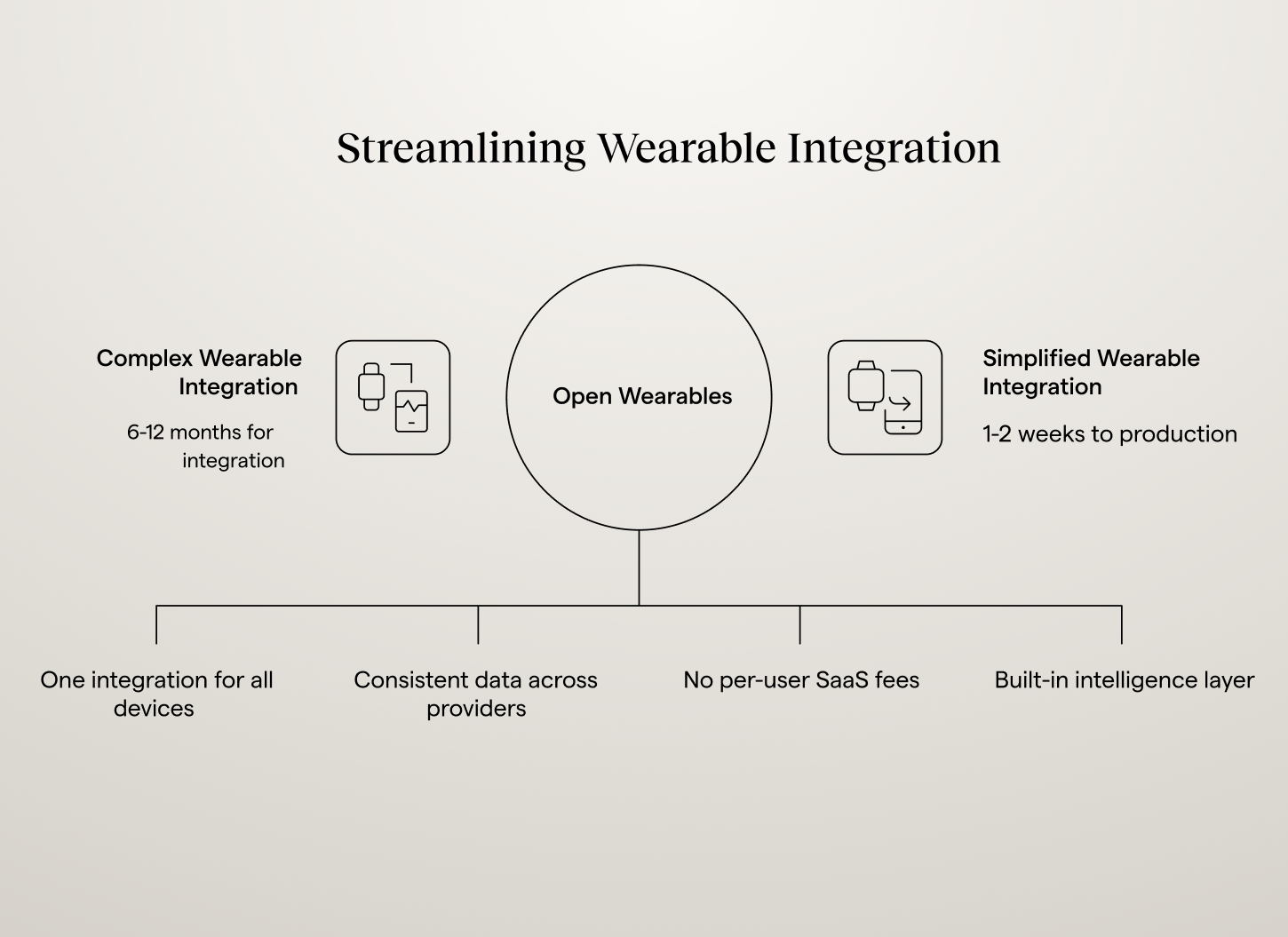
Whether you’re building a fitness app, wellness platform, or performance tracking tool, integrating wearable data is now table stakes but there’s one catch. Connecting multiple wearables traditionally means 6-12 months of fitness app development work, managing different OAuth flows, normalizing data schemas across providers, and maintaining vendor-specific integrations.
Here’s the challenge: Your users wear Apple Watches, Garmin devices, Oura Rings, Whoop bands, and Fitbit trackers. Each wearable speaks a different language. Building direct integrations means:
- 6+ separate API implementations (Apple HealthKit, Garmin API, Oura API, Whoop API, Fitbit API, etc.)
- Different data formats for the same metrics (steps, heart rate, sleep)
- Ongoing maintenance as providers update their APIs
- 3-6 months minimum before your first user can connect their wearable
Open Wearables solves this by providing a unified wearable API that works across all major devices:
- One API integration instead of 6+ separate implementations
- Normalized data model across all providers
- 1-2 weeks to production instead of months
- Self-hosted infrastructure (no per-user SaaS fees)
- AI-ready with built-in intelligence layer
Proof at scale: Heart Monitor, a health app with 90,000 active users, completed its full Open Wearables integration in about one week. See how.
For fitness app development teams, this means focusing on building great user experiences and coaching features instead of wrestling with OAuth flows and data normalization.
Which wearable brands does Open Wearables support?
The roadmap is updated regularly, and integrations can be prioritized based on user needs. Check the GitHub repository for the current list, since new providers are added over time. If your users are asking for a specific device, the team can fast-track it.
Do users need accounts on each wearable platform?
No. There’s no need to create new accounts. Simply authorize Open Wearables to access existing wearable provider account through a standard OAuth flow - the same login experience they use for “Sign in with Google.”
The only exception is Apple Health, which requires a mobile SDK because Apple doesn’t provide a backend API but your users already have Apple Health if they own an iPhone.
Do users need the wearable apps installed on their phones?
No. Integration works through API access. Users authorize once, and data flows automatically.
The only exception is Apple Health, which requires HealthKit SDK access through a mobile app. Open Wearables provides native Swift, Flutter, and React Native SDKs to handle this.
How does Apple HealthKit integration work?
Apple HealthKit is the iOS framework that stores health data from Apple Watch, iPhone, and third-party health apps. Unlike other wearables that provide backend APIs (like Garmin API, Oura API, or Whoop API), Apple HealthKit requires mobile app integration using the HealthKit SDK.
Apple doesn't provide a backend API for HealthKit data itself. You need a mobile app that uses the HealthKit SDK to retrieve data from HealthKit and send it to your backend.
Open Wearables simplifies Apple HealthKit integration with:
- Native iOS and Flutter SDKs for HealthKit integration
- React Native SDK for cross-platform apps
- A standalone mobile app for teams that don't want to build their own client
For web-only applications, you’ll need a bridge app or a simple companion app on the App Store to collect Apple HealthKit data but Open Wearables makes this process as painless as possible with pre-built SDKs and white-label solutions.
Key Apple HealthKit data types available:
The HealthKit SDK integration works seamlessly with Open Wearables’ unified data model, so Apple Health data is normalized alongside data from Garmin, Oura, Whoop, and other wearables.
Can you write data back to wearables (like creating training sessions)?
No. Open Wearables currently operates as read-only, meaning you can pull health data from wearables but not write data back to them.
This covers the majority of health app use cases: tracking metrics, analyzing patterns, providing coaching insights, and building personalized recommendations.
Write capabilities (like creating training sessions or updating goals directly on devices) are not currently supported. This may change in future releases based on community demand, but it's not on the immediate roadmap. If your application specifically requires write functionality, you'll need to implement direct integrations with individual wearable APIs alongside Open Wearables.
What data can you collect from wearables?
Open Wearables collects all available data from each wearable provider based on the scopes you request during OAuth setup. This typically includes:
You configure which data scopes to request per provider. The platform collects everything available, but you only use what’s relevant for your application.
Can you choose which data to collect?
Yes. When setting up OAuth with each provider, you specify which data scopes to request. For example, you might request only sleep and HRV data for a recovery app, or steps and workouts for a fitness tracker.
The platform typically collects all available data to avoid re-requesting permissions later, but you control what gets used in your app’s logic.
How Does Data Deduplication Work with Multiple Devices?
Open Wearables collects data from all connected sources. Deduplication happens when multiple devices report the same metric for the exact same timestamp for example, if both your Apple Watch and Whoop record step counts for the same specific second.
In conflict cases, the platform resolves duplicates using configurable priority rules. This lets you control which device to trust when conflicts occur. For instance, if your Whoop recorded 10,000 steps and your Apple Watch recorded 9,500 steps for the same time period, you can configure the system to consistently prefer one source over the other.
The priority system works at two levels:
- Device-type priority: Set hierarchy like smartwatch > phone > other devices
- Provider priority: Choose between providers when device types match (Garmin vs. Apple Watch)
You configure these rules in your Open Wearables instance. For example: "Always trust Oura Ring for sleep data and Garmin for workout data, but when both are smartwatches, prefer the one with higher accuracy rating.”
Custom Implementation:
Since Open Wearables is open-source, you can extend the deduplication logic directly in the platform code if you need specific prioritization rules beyond the built-in configuration. This keeps deduplication logic centralized rather than handling it in your application layer.
Alternatively, you can avoid conflicts entirely by having users connect only their primary device for each metric type.
For production apps where data accuracy matters (like clinical research or corporate wellness programs), configuring clear priority rules or extending the platform code gives you precise control over data quality.
Can you access historical data from before the integration point with the Open Wearables?
Yes, but it depends on the provider:
Apple Health: Full historical synchronization supported through the Flutter SDK. Users can sync all available data from their iPhone.
Garmin: API provides recent data by default. Historical access depends on your Garmin developer agreement and may have limitations.
Other Providers: Varies by platform. Most providers support some level of historical backfill through their APIs.
For new users connecting wearables, historical data means they see immediate value instead of starting from zero. The extent of history available depends entirely on what each wearable provider allows through their API.
How is data stored? What are the infrastructure requirements?
Open Wearables is self-hosted on your infrastructure. It uses PostgreSQL by default, with plans to support TimescaleDB for better performance with large time-series datasets.
The solution is designed to be modular and database-agnostic, allowing you to easily adapt it to your existing stack. Data never leaves your control; however, Momentum can help with setup and deployment as part of development engagements. Nevertheless, your instance runs entirely on your servers. There's no shared hosting or multi-tenant architecture where your data mingles with other customers' data.
How long does integration take?
Basic setup: Minutes using Docker.
Full integration: Open Wearables itself deploys in minutes but you need to apply for API credentials with each wearable provider (Garmin, Apple Health, etc.). Provider approval processes vary, some are immediate, others take weeks. Good news is it's a one-time process, and it's the same whether you use Open Wearables or build integrations yourself.
Once you have credentials, the actual integration (OAuth flows, data sync, testing) takes days, not months.
What’s the setup process?
Step 1: Clone the repository and deploy
Clone the Open Wearables repository and navigate to the project directory:
git clone https://github.com/the-momentum/open-wearables.git
cd open-wearables
Step 2: Configure environment variables
Backend configuration:
cp ./backend/config/.env.example ./backend/config/.envFrontend configuration:
cp ./frontend/.env.example ./frontend/.envStep 3: Start the application
Using Docker (Recommended):
The easiest way to get started is with Docker Compose:
docker compose up -dFor local development setup without Docker take a look at docs
Step 4: Seed sample data (optional but recommended):
If you're using Docker, seed the database with sample data including an admin account
make initThis will create:
- An admin user account (admin@admin.com / secret123)
- 10 test users
- Sample activity data for test users
Step 5: Access the developer portal:
Open the local admin panel to access the developer portal and create API keys.
Step 6: View API documentation:
Open docs in your browser to explore the interactive Swagger UI.
{{lead-magnet}}
How can I test Open Wearables before connecting real devices?
Yes. Deploy Open Wearables locally using Docker. Then, since the platform includes sample data generation scripts that populate realistic health data just “make init” and seed syntetic user data to test your integration without connecting actual wearables.
For Apple Health testing, you'll need physical iOS devices since HealthKit doesn't work in simulators.
What SDKs are available?
Flutter SDK: Cross-platform SDK wrapping the native iOS and Android implementations, handling Apple Health integration with background sync, token authentication, and automatic data normalization.
React Native SDK: TypeScript API via the Expo Module API, for background sync from HealthKit and Health Connect.
Native iOS SDK: Swift SDK for Apple HealthKit background sync, with background delivery, streaming sync, and secure token storage.
Native Android SDK: Kotlin SDK for background sync from Samsung Health and Health Connect, with dual provider support and a WorkManager-backed sync.
Each SDK ships with integration guides, example apps, and troubleshooting documentation. Teams that want to avoid building their own client can also use the standalone mobile app.
Can you use Open Wearables with a web-only application?
For most wearables (Garmin, Suunto, Polar, Whoop): Yes. They support web-based OAuth flows.
For Apple Health: You need a mobile app because Apple requires HealthKit SDK access. There's no backend API for Apple Health data.
Options for web-only applications:
- Add a companion mobile app using the Flutter SDK for Apple Health integration
- Skip Apple Health and support only cloud-based wearables
- Build a minimal iOS app solely for Apple Health data collection that syncs to your web platform
Most health apps that want Apple Health data use option 1, a lightweight mobile component alongside their web platform.
Are there any per-user fees in Open Wearables?
No. Zero per-user fees. You only pay for:
- Your own infrastructure costs (hosting, database storage)
- Optional expert services or custom features from Momentum (if needed)
- LLM API costs if you use AI chat features (OpenAI, etc.)
Compare this to per-user SaaS pricing, which scales with your user base and can eat meaningfully into your margin at volume.
What are the costs after implementation?
Ongoing costs:
- Infrastructure: your own hosting and database. For a small or early-stage deployment this can run $50-500/month; at production scale (10,000+ active users) expect a few thousand dollars a month, depending on your data retention policy, the number of data points you pull and store, your hosting setup, and sync frequency.
- Optional: LLM API costs if using AI features (variable based on usage)
No per-user charges. No pricing tiers. Your infrastructure cost stays flat as your user base grows, instead of scaling per user the way SaaS pricing does.
How does Open Wearable compare to commercial SaaS aggregators?
Open Wearables runs on infrastructure you control, with a data model you can inspect and modify.
What is the difference between Open Wearables and Terra API?
Terra API is a commercial SaaS platform that aggregates wearable data from multiple devices through a single API. You sign up, get API credentials, and start pulling data without managing infrastructure. User health data flows through Terra's servers so they handle processing and storage. That means you don't control where data resides or how long it's retained. For healthcare applications with strict data sovereignty requirements, this creates compliance complications.
It's closed architecture. If you need a specific data transformation or custom integration you have to submit a feature request and wait. Moreover no access to source code means no ability to modify how data is processed or stored.
Open Wearables flips this model completely.
Your Own Infrastructure Costs
A company runs its own infrastructure, sized to its own usage, instead of routing usage through a third party's billing system.
You Own Everything
Deploy Open Wearables on your infrastructure via Docker. User health data never leaves your servers. You control retention policies, backup strategies, and compliance requirements. Critical for HIPAA or GDPR environments where data sovereignty isn't negotiable.
Full Code Access
Need to modify how sleep data is normalized? Want to add custom biometric calculations? You can. The entire codebase is open source. Fork it, customize it, deploy your version without vendor approval or roadmap delays.
Infrastructure Control
Open Wearables is self-hosted, meaning you handle deployment, monitoring, and updates. This gives you complete control over the data pipeline and infrastructure.
What is the difference between Open Wearables, Junction and Rook API?
Junction and Rook API are commercial aggregators tailored for the health and wellness sector. Like other SaaS providers, they offer a unified interface to collect wearable data but operate on a proprietary, closed-loop system that requires developers to integrate with their specific external ecosystems.
Both platforms charge per active user. These costs add up quickly as you scale. Beyond the base fees, you'll hit API call limits based on your subscription tier. Need more calls? Upgrade to a higher tier. Your costs grow with both user count and API usage, creating unpredictable expenses as your app grows.
They run as multi-tenant SaaS platforms and your data sits on their servers alongside other customers' data. This shared infrastructure means rate limits and throttling. When you need to pull data, you're competing with other customers for resources. Your app's performance depends on their infrastructure capacity and how they allocate it across tenants.
Using these services means trusting their security certifications and processes. You're responsible for overall compliance, however you can't see how they actually handle data on their servers. This works fine until you need HIPAA compliance or need to prove data handling for an audit. Then you're stuck explaining why you can't provide detailed documentation of the entire data pipeline.
The Open Wearables Advantage over Junction and Rook API
Open Wearables provides a strategic edge through total infrastructure sovereignty instead of a third party's hosted architecture.
- HIPAA and Compliance Control: Because Open Wearables is self-hosted, you have complete control over the environment. This makes it significantly easier to meet strict HIPAA or GDPR requirements, as data never leaves your controlled infrastructure.
- Performance Without Limits: By managing your own infrastructure, you eliminate third-party rate limits. Your application can scale its data processing power according to its own needs, not a vendor's tier.
- Proprietary Innovation: Unlike commercial APIs that offer a "one-size-fits-all" data output, Open Wearables' open-source nature allows you to build custom AI features and proprietary algorithms directly into the data pipeline.
- Zero Vendor Dependency: Using Open Wearables ensures that if a commercial provider like Junction or Rook were to sunset their service or change their pricing, your platform remains fully operational and unaffected.
Can You Build Proprietary Algorithms on Top of Open Wearables?
Absolutely. This is exactly what Open Wearables is designed for. The platform provides normalized, time-series health data in a consistent format across all wearable devices, creating the foundation for your proprietary algorithms and AI models.
Instead of spending months on data cleaning and integration across Apple Health, Garmin, Oura, and other platforms, you get clean, structured data ready for machine learning from day one. Your competitive advantage comes from the intelligence you build on top, not from wrestling with different API formats.
Examples of what teams are building:
- Personalized recovery scores - Combine HRV, sleep quality, and training load to calculate user-specific recovery states
- Training readiness indicators - Predict optimal workout timing based on sleep patterns and previous activity
- Stress detection algorithms - Identify stress patterns from heart rate variability and sleep disruption
- Sleep quality predictions - Forecast next-day performance based on sleep stage distribution
- Custom health insights - Build domain-specific algorithms for your user base (athletes, corporate wellness, chronic condition management)
For a broader picture of how different user types are applying Open Wearables from solo founders to sports performance organizations and digital therapeutics companies see 8 real-world wearable data integration use cases.
Since Open Wearables is open-source, you can modify the data pipeline itself to add preprocessing steps or feature engineering directly where data enters the system. Commercial APIs don't let you do this.
If you need help building custom algorithms or want to accelerate development, our healthcare AI team can implement these features as part of your Open Wearables deployment.
Where Is User Data Stored?
Data lives on your infrastructure. Open Wearables is self-hosted, which means you control where data goes, who can access it, and how long it's retained and it never flows through our servers.
If you work with us on implementation, we can help configure your infrastructure and deployment, but the platform always runs on your servers, not ours. For HIPAA or GDPR compliance, you can demonstrate complete data lineage without third-party data processing agreements."
How Does This Compare to Commercial Aggregators?
With SaaS platforms (Terra, Junction, Rook, Spike):
Your users' wearable data flows through the vendor's servers before reaching yours. The vendor decides where data is stored (which AWS region, which data centers), who on their team can access it for debugging, and what security protocols apply. You sign a Business Associate Agreement for HIPAA, but you can't audit their actual data handling practices.
If the vendor gets acquired, changes their terms, or shuts down, your data pipeline depends on their decisions.
With Open Wearables:
You deploy on your own AWS, GCP, or Azure account. You choose the region, configure encryption, set access policies, and control every aspect of data handling. When auditors ask to see your data pipeline, you can show them the actual infrastructure and code.
If you need to migrate or change providers, you own the entire stack and can move it wherever you want.
Do You Need to Apply for API Credentials Yourself?
Yes. You apply directly to each wearable provider (Apple, Garmin, Fitbit, etc.) for API credentials. This typically takes 1-4 weeks per provider.
What this means in practice:
You create developer accounts with each platform, submit applications explaining your use case, and receive OAuth client IDs and secrets. These credentials live in your environment variables, not in a vendor's system.
The benefit: you own the relationship with wearable providers. If Garmin changes their API, you get notified directly instead of waiting for a SaaS vendor to update their integration. If there's an issue, you contact Garmin support directly instead of going through a middleman.
The tradeoff: you handle the application process yourself, though Momentum can guide you through it if needed.
What About Developer Approval Processes?
Some platforms require review before granting production access:
- Apple Health - No formal approval, but App Store review if building mobile apps
- Garmin - Developer program application, typically approved in 3-7 days
- Fitbit - Automatic approval for standard API access
- Oura - Application required for production access
- Whoop - Partnership discussion for large deployments
Most approvals are straightforward if you explain your use case clearly. Momentum has gone through these processes multiple times and can help you avoid common mistakes that delay approval.
Are There Branding Requirements from Wearable Providers?
Yes. Each wearable provider has specific requirements about how you display their branding and attribute data sources. Since you're using your own API credentials with Open Wearables, you're responsible for following these guidelines, the same as if you built the integration yourself.
What the requirements typically include:
- Source attribution - Show where data came from (e.g., "Data from Garmin" or "Synced with Apple Health")
- Logo usage - Display provider logos according to brand guidelines (correct size, colors, placement)
- Data labeling - Indicate the source on dashboards showing multi-device data
- Terms of service links - Provide links to the provider's terms and privacy policy
Provider-specific examples:
Garmin requires "Powered by Garmin" or similar attribution near data displays, along with their logo following brand guidelines. Their developer documentation includes downloadable logo assets and placement rules.
Apple Health requires apps to explain clearly which HealthKit data types are accessed and why. If you're showing aggregated data from multiple sources, Apple's guidelines say to identify which data came from HealthKit.
Fitbit (now Google) requires attribution when displaying data pulled from their API, with specific logo usage guidelines in their developer terms.
Oura asks for clear source attribution and provides brand assets through their developer portal.
Where to find these requirements:
Each provider includes branding guidelines in their developer documentation:
- Apple: HealthKit developer guidelines
- Garmin: Health API branding section
- Fitbit: Web API developer terms
- Oura: Developer portal resources
The requirements are straightforward, usually a few lines of text or a small logo. Most developers implement this in an afternoon.
What happens if you don't comply?
Providers can revoke API access if you violate their terms, though in practice they usually send a warning first. The bigger risk is app store rejection. Apple reviews HealthKit usage carefully, and incorrect attribution can delay approval.
How this compares to SaaS platforms:
Commercial aggregators like Terra, Junction, and Rook handle some of this for you by adding their own attribution layer. However, you still need to follow provider requirements for how you display data to end users.
With Open Wearables, you implement branding requirements directly, which gives you more control over your UI but means you're responsible for compliance. The tradeoff: you can design exactly how attribution appears instead of being limited by a vendor's implementation.
Implementation in Open Wearables:
Open Wearables tracks data source for each record, making it easy to add attribution. When displaying data, query the source field and add the appropriate branding:
Can You Migrate from Terra, Junction, or Rook?
Yes, but migration requires work. Each commercial platform has its own data model, so you can't just swap APIs and expect everything to work.
What migration actually involves:
You're moving from vendor-specific schemas to Open Wearables' unified format. For example, Terra returns sleep data as sleep_durations_data.stages.deep while Open Wearables uses sleep.stages.deep_minutes. Your application code that processes this data needs updates.
The typical migration path:
- Deploy Open Wearables on your infrastructure alongside your existing integration
- Map data structures from the commercial API format to Open Wearables format
- Update data processing code to work with the new schema
- Test with a subset of users before full migration
- Switch over once you've validated data consistency
Timeline depends on how much custom logic you built on top of the commercial API. Simple dashboards might migrate in days. Complex ML pipelines with lots of data transformations could take weeks.
Historical data migration:
Commercial platforms typically don't provide full historical exports. You'll likely need to run both systems in parallel during transition, keeping old data in the commercial platform while new data flows through Open Wearables. Plan for this in your database schema.
Can You Use Open Wearables Alongside Existing Integrations?
Yes. Open Wearables doesn't force an all-or-nothing migration.
Common hybrid approach:
Keep your existing Garmin and Apple Health integrations working while adding new wearables through Open Wearables. This lets you:
- Get Oura, Whoop, or Suunto data without building new integrations from scratch
- Test Open Wearables with a subset of users before full migration
- Avoid rewriting working code while expanding device coverage
Your application will query two different systems (your legacy integrations and Open Wearables), which adds some complexity. You'll need to handle data from different sources and potentially deduplicate if a user connects the same device through both systems.
When hybrid makes sense:
If you already have solid Apple Health and Garmin integrations that work well, adding Open Wearables just for additional devices might be the fastest path. You get broader device coverage without touching legacy code.
But if your existing integrations are brittle or hard to maintain, full migration to Open Wearables unifies everything and reduces the number of systems you're maintaining.
What about deduplication?
This is the main technical challenge with hybrid setups. If a user connects their Garmin through both your legacy integration and Open Wearables, you'll see duplicate workout records.
Open Wearables includes deduplication logic based on timestamps and data signatures, but it only works for data flowing through Open Wearables. You'll need to add deduplication logic in your application layer for data coming from both systems.
The cleaner long-term solution is usually full migration, but hybrid works fine if you have a good reason to keep legacy integrations running (like avoiding user re-authentication or not wanting to rebuild complex data transformations).
What If I Already Have Some Integrations Built?
Starting with Apple Health and Garmin already integrated is common. Open Wearables still provides value:
Expanding device coverage without rebuilding your entire integration layer. Adding Oura takes days with Open Wearables instead of weeks building a custom integration.
Unified data model across all devices. Right now you're probably handling Apple Health and Garmin data differently. Open Wearables normalizes everything into one schema, simplifying your analytics and ML code.
Self-hosted compliance if you're moving toward HIPAA certification or enterprise customers who require data control. Commercial aggregators add complexity to compliance documentation.
Future-proofing your integrations. When new wearables become popular, you add them through Open Wearables instead of building custom integrations each time.
The tradeoff: you'll maintain two systems (your existing integrations and Open Wearables) until you fully migrate. Whether that's worth it depends on how much you value the benefits above versus the simplicity of a single integration approach.
What Happens When You Need Help?
Open Wearables is open-source, which means support works differently than commercial platforms. There's no support ticket system or guaranteed response times unless you arrange that separately.
Community support:
The GitHub repository has issues and discussions where you can ask questions or report bugs. Usually you'll get an answer in hours depending on who's online and what timezone they're in.
There's a Discord server where developers share integration experiences and solve problems together. It's small but active, mostly people building health apps who've run into similar issues.
Documentation covers most common scenarios (API setup, provider configuration, data schemas), but if you're doing something unusual, you might need to read the source code to understand how it works.
When community support isn't enough:
If you need faster responses or custom implementation help, Momentum offers paid support. This means:
- Architecture review before you start building
- Help with provider API applications and approval processes
- Custom feature development if you need something not in the core platform
- SLA agreements for production deployments that need guaranteed response times
The tradeoff: paid support costs money, but you get engineers who've deployed Open Wearables multiple times and know the edge cases. For early-stage teams, community support plus reading the docs usually works fine. For production deployments or complex integrations, paying for expertise often saves weeks.
Can You Contribute to the Project?
Yes, and certain types of contributions are more useful than others.
Adding new wearable provider integrations is the most impactful. If you need support for a device that isn't in Open Wearables yet (like Withings or Polar), building that integration and contributing it back helps everyone.
Fixing bugs you encounter in production is immediately valuable. If something breaks with your use case, the fix probably helps others too.
Documentation improvements based on confusion you experienced. If the setup guide was unclear or missing steps, adding those details helps the next person.
How to contribute:
Open a GitHub issue first to discuss what you want to build. For new provider integrations, check if someone else is already working on it. For big architectural changes, expect discussion about whether it fits the project direction.
Pull requests need tests and documentation. Code-only PRs usually get asked to add these before merging.
Latest Updates
Open Wearables is under active development, with new providers, features, and SDK updates shipping regularly. Current capabilities include a Flutter SDK for native Apple Health integration, an MCP server that connects wearable data to Claude and other AI assistants, a dashboard with dedicated views for workouts, activity, sleep, and body measurements, and broad provider coverage across Garmin, Apple Health, Google Health Connect, Samsung Health Connect, Oura, Fitbit, Suunto, Polar, and Whoop.
Full release notes are available on the GitHub Repository.
From Wearable Data to Health Intelligence
If your team has the data flowing and is now figuring out what to do with it, that is the starting point for Signal. Momentum's delivery framework for wearable health intelligence: Blueprint maps your use case, Foundation connects the data sources and deploys the intelligence layer, Intelligence lands coaching, insights, or dashboards inside your app. We bring the integrations, the data layer, and the intelligence. Your team ships the experience.
%201.png)


.avif)
.avif)
.png)

