

%201.avif)
Key Takeaways
- Open Wearables 0.3 alpha delivers first mobile SDK for Flutter, bringing native Apple Health integration directly into mobile applications without custom HealthKit implementation
- MCP Server Integration connects wearable data to Claude and ChatGPT, enabling conversational AI health insights and natural language queries of user metrics
- Redesigned developer dashboard introduces dedicated views for workouts, activity, sleep, and body measurements with improved data visibility
- Source prioritization and connection visibility limitations identified in production testing are now top development priorities for upcoming releases
- Extended Garmin support, XML uploads, Sentry error handling, and comprehensive documentation updates strengthen platform reliability and developer experience
Is Your HealthTech Product Built for Success in Digital Health?
.avif)
Momentum is releasing Open Wearables 0.3 alpha with our first mobile SDK for Flutter, targeting Apple Health integration. This release brings Open Wearables capabilities directly into mobile applications, eliminating the need to build custom HealthKit wrappers or manage complex OAuth flows for health data access.
What is Open Wearables
Open Wearables is our open-source platform that democratizes access to wearable health data by unifying multiple device APIs through a single interface. Built by Momentum's healthcare development team after integrating wearables for dozens of clients, it solves a recurring problem: developers either spend months building custom integrations or pay expensive SaaS platforms that create vendor lock-in.
Our self-hosted approach gives you complete control over user data while providing clean, normalized health metrics ready for analytics and machine learning.
If you need this kind of wearables software development built into a product rather than self-managed, that is the kind of work our wearables software development team does day to day.
Here's a full demo with explanation:
Flutter Health SDK for Apple Health
The Open Wearables Health SDK provides native Flutter integration with Apple Health data. Instead of managing HealthKit, permission flows, and data synchronization separately, the SDK handles the complete integration lifecycle automatically.
What the SDK Does
The Open Wearables Flutter SDK handles secure health data synchronization between Apple HealthKit and your Open Wearables instance.
The SDK implements token-based authentication that keeps API credentials secure on your backend. Your server generates access tokens, the SDK stores them in iOS Keychain, and automatically restores sessions when users return. Once configured, the SDK pulls new health data from Apple HealthKit and syncs it to Open Wearables automatically, even when your app is in the background. It uses incremental sync to transfer only new data and resumes interrupted sessions when connectivity returns.
Data arrives in Open Wearables' standardized format - the same structure used for Garmin, Polar, Oura, and other providers. Your application queries consistent API endpoints and receives consistent data structures regardless of the source.
This provides a reference implementation for developers building their own health applications, showing real data flow from Apple Health through the SDK to Open Wearables.
Demo Application Included
The demo application (view in docs) demonstrates the complete integration flow: SDK configuration, authentication with dashboard credentials, HealthKit permission requests, background sync enablement, and sync status monitoring.
The example app runs on physical iOS devices (HealthKit doesn't work in simulators) and shows the actual data flow: create a user and generate an access token in the Open Wearables dashboard, enter those credentials in the mobile app, grant HealthKit permissions, start background sync, and watch your health data appear in the dashboard.
The source code provides reference implementations for SDK initialization, sign-in with userId/accessToken, authorization requests for specific health data types, and background sync setup. Demo videos walk through both the dashboard token creation process and the mobile app connection flow.
Current Limitations
Working with Apple Health in production revealed several issues we're addressing in upcoming releases.
Source prioritization is the most significant limitation. Apple Health stores data from multiple sources (iPhone and Apple Watch), and the SDK currently doesn't prioritize which source to trust when conflicting data exists. This creates ambiguity in data reliability and is now our top development priority.
Connection visibility doesn't work correctly yet. SDK connections don't appear in the user's connected providers list, though data syncs properly and appears in the relevant data views.
Data origin tracking is incomplete. The platform doesn't record whether data came through the SDK or cloud API, or which specific hardware device collected it.
Sync monitoring lacks visibility. There's no clear way to track sync volume, completion status, or errors without diving into backend logs.
Use Cases Enabled
Fitness coaching applications can now have users connect Apple Watch data directly through the mobile app. Workouts, heart rate, and activity metrics sync automatically to your Open Wearables instance, where your coaching logic analyzes the data and provides recommendations.
Health monitoring platforms for medical providers can deploy mobile apps where patients connect their Apple Health data. The data flows automatically to your healthcare platform through Open Wearables, providing consistent monitoring without requiring patients to manually export or upload data.
Research applications benefit from standardized data collection. Study participants install your app, connect Apple Health, and their data syncs to your Open Wearables instance with consistent structure across all participants regardless of their specific devices or iOS versions.
Redesigned Developer Dashboard
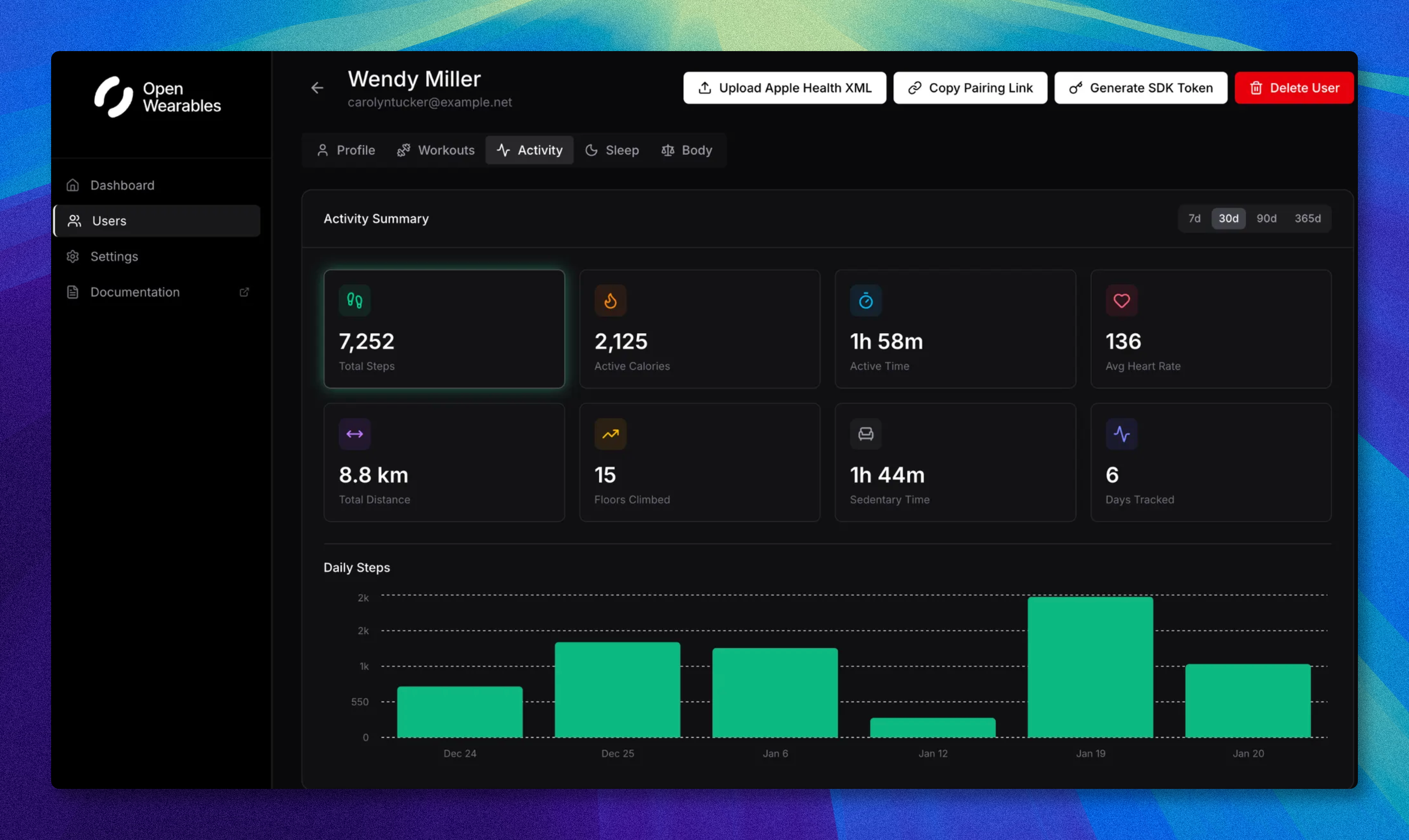
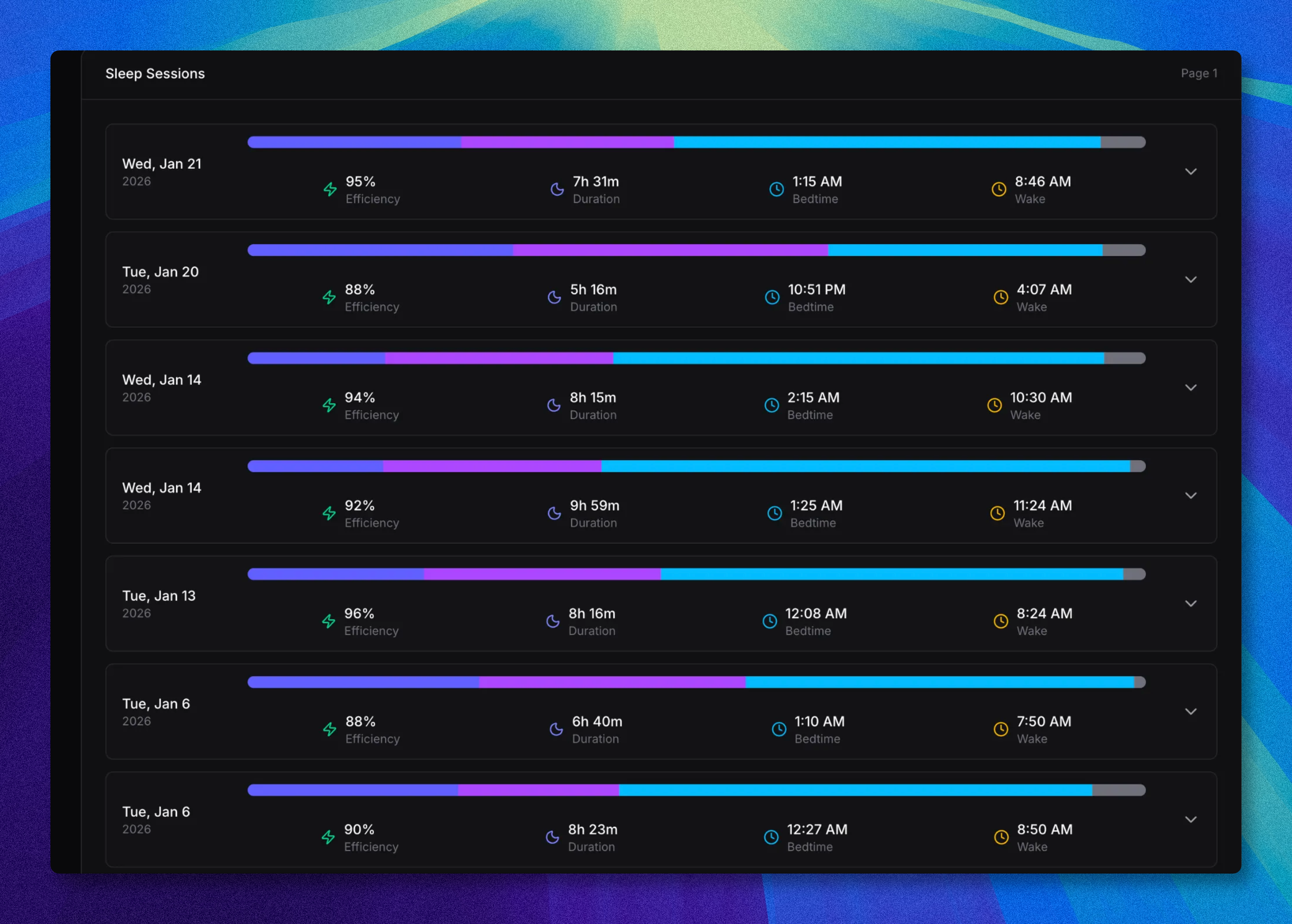
The dashboard received a complete UI refresh with dedicated views for different data types. Workouts, activity metrics, sleep tracking, and body measurements now have separate interfaces designed for viewing the specific data structures each provides.
The new design improves data visibility both for developers testing integrations, as well as for individual users who would like to use Open Wearables to track their data. When you run the platform demonstrates how each data type displays with realistic health metrics.
Screenshots of each panel are below.
Workouts data:

Activity data:
Sleep data:
Body data:

MCP Server Integration
Open Wearables data is now accessible directly in Claude and ChatGPT through MCP server implementation. This establishes infrastructure for AI agents to query and analyze wearable data conversationally.
The integration enables developers to build applications where users can ask questions about their health data in natural language. Claude or ChatGPT can query the Open Wearables API, retrieve relevant metrics, and provide contextual analysis based on the user's actual wearable data.
Currently available through stdin connection with additional tools already in development. Implementation details and use cases are documented in pull requests #307 and #287 on the GitHub repository.
.png)
Additional Improvements
Garmin integration now supports additional data types beyond the initial workout implementation, expanding coverage of Garmin's health metrics API. (PR: #275 and #311)
XML upload functionality in the dashboard allows direct data imports for testing and development without requiring active wearable connections. (PR: #296)
Sentry error handling now covers Celery background tasks, improving visibility into data sync failures and processing errors across the platform. (PR: #309)
Documentation updates cover the new Flutter SDK, expanded API endpoints, and integration patterns for mobile applications.
Getting Started
Open Wearables 0.3 alpha is available on GitHub. Clone the repository, start Docker containers, and run the init script to populate sample data.
We also encourage you to test the latest Apple Health SDK and sync your own data using the sample Flutter app included in this SDK. You'll find the complete setup guide and integration examples in our documentation at SDK Flutter Open Wearables Documentation
Full platform documentation is at docs.openwearables.io
From Wearable Data to Health Intelligence
If your team has the data flowing and is now figuring out what to do with it, that is the starting point for Signal. Momentum's delivery framework for wearable health intelligence: Blueprint maps your use case, Foundation connects the data sources and deploys the intelligence layer, Intelligence lands coaching, insights, or dashboards inside your app. We bring the integrations, the data layer, and the intelligence. Your team ships the experience.
Frequently Asked Questions



.png)
.avif)
.avif)
.avif)

