



Key Takeaways
- AWS Client VPN provides secure, certificate-based remote access to VPC resources, ideal for distributed teams working remotely.
- The implementation uses a three-tier certificate system (root, server, client) managed through AWS Certificate Manager for enhanced security and access control.
- Split tunneling can be enabled to optimize routing and reduce data transfer costs by only routing AWS-bound traffic through the VPN.
- The solution includes comprehensive logging via CloudWatch for audit and compliance purposes, tracking connection attempts, duration, and user activity.
- Security is maintained through proper subnet associations, authorization rules, and security group configurations, ensuring protected access to resources like RDS instances.
Is Your HealthTech Product Built for Success in Digital Health?
.avif)
Last updated: June 2025
In this article, we’ll walk through implementing AWS Client VPN using Terraform. I also want to outline the issue of providing secure connections to your infrastructure, in this case AWS VPC, particularly when an entire company is working fully remotely, which is a common case nowadays.
If you want to jump to a ready-to-use module, check out the links in the Summary section.
Problem
Secure network connectivity is crucial when building modern systems, especially for organizations with distributed teams. While traditional site-to-site VPNs work well for connecting office locations, they don’t address the needs of remote employees working from different parts of the world with dynamic IP addresses.
I recently faced this challenge when implementing a VPN solution for a fully remote company that needed to access some parts of their infrastructure (DB read replicas, Superset for analytics) in a secure way due to compliance reasons. Each employee required secure VPC access regardless of their current IP address, so Site-to-Site VPN and connecting to the office was not an option.
The pattern that I found suitable for this case is Client VPN—a managed client-based VPN service that provides secure and encrypted access to on-premises networks and automatically scales up to the number of users.
It uses self-signed certificates for authentication instead of IP addresses and also provides TLS encryption. It allows company employees to access their VPC resources without exposing them publicly from any place they work in and manages access using tunnel connections efficiently.
{{lead-magnet}}
Theory
AWS Client VPN uses a Client VPN endpoint to provide connection to VPC. The client establishes the VPN session from their local computer or mobile device using an OpenVPN-based VPN client application. After they have established the VPN session, they can securely access the resources in the VPC where the associated subnet is located.
Later, you can also implement Virtual Private Gateway, Site-to-Site VPN, and Customer Gateway to “pipe” this traffic to your on-premises network and treat VPC as a “proxy”.
Under the hood, AWS VPN Client enhances OpenVPN.
An in-depth look at how Client VPN works is as follows:
- First, the Client resolves DNS of the Client VPN endpoint and then initiates contact
- The Client initiates a UDP connection to the server and creates a virtual TUN interface for tunneled traffic
- The Client and servers perform a TLS handshake, and when validated, both sides agree on encryption parameters
- The TUN interface is configured with an IP address, routes are set up for tunneled traffic, and the connection is ready to use
Note that we use manual authentication that uses certificates to perform authentication between client and servers. Certificates are a digital form of identification issued by a certificate authority (CA). The server uses client certificates to authenticate clients when they attempt to connect to the Client VPN endpoint.
You can create a separate client certificate and key for each client that will connect to the Client VPN endpoint. This enables you to revoke a specific client certificate if a user leaves your organization. In this case, when you create the Client VPN endpoint, you can specify the server certificate ARN for the client certificate, provided that the client certificate has been issued by the same CA as the server certificate.
It is also possible to create custom logic for authorization by enhancing AWS Lambda functions.
Scheme
In this article, I focus on connecting to a single VPC, but when you need to connect to two or more VPCs, you can enhance VPC peering connection to do so. It is also possible to do Client to Client connection.
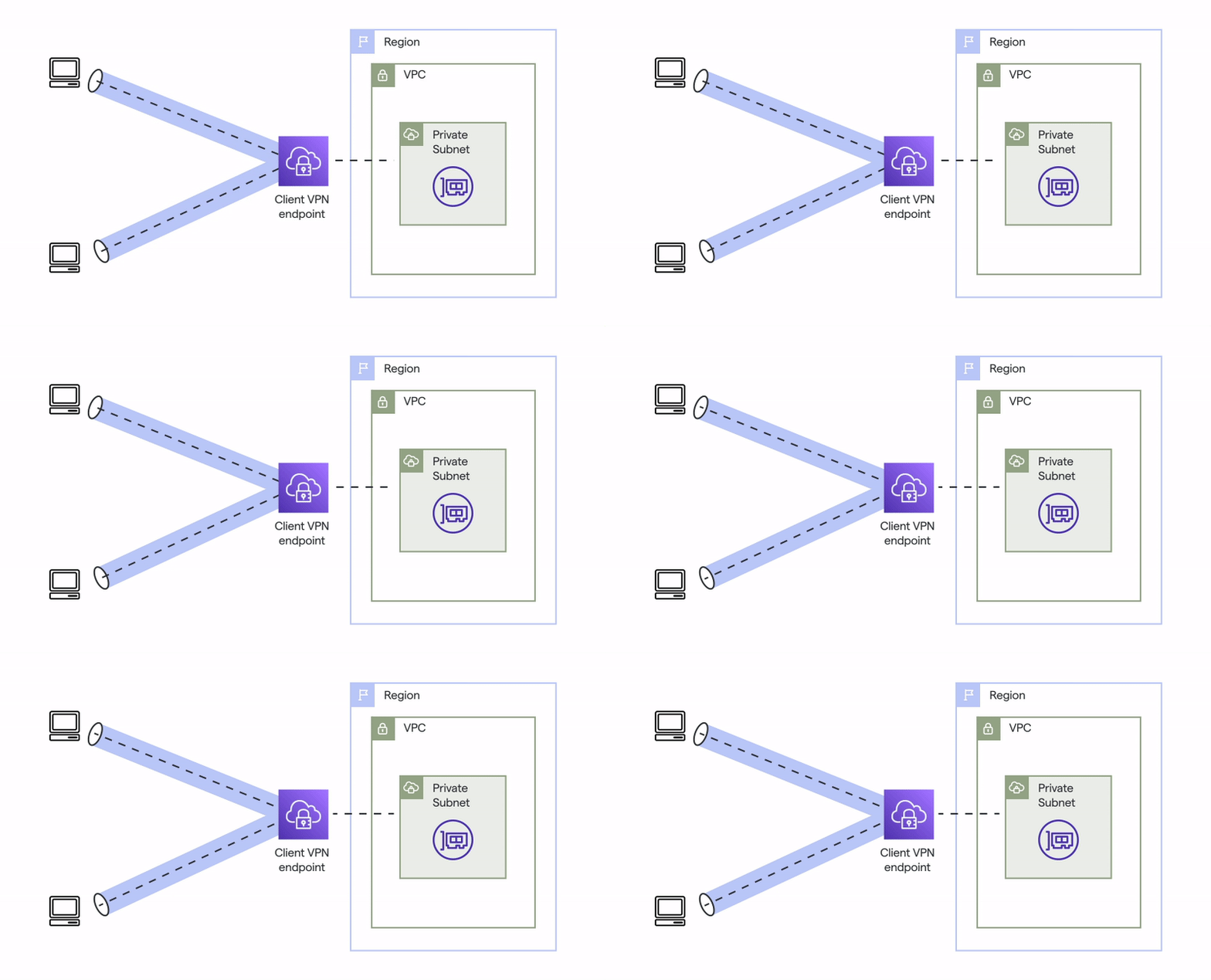
Note:
- You need to create or identify a VPC with at least one subnet. Identify the subnet in the VPC to associate with the Client VPN endpoint and note its IPv4 CIDR ranges.
- Identify a suitable CIDR range for the client IP addresses that does not overlap with the VPC CIDR.
Prerequisites
- Terraform installed on your system (version 1.9 was used for this tutorial)
- VPC with at least one subnet
- AWS admin access credentials (access key and secret key) configured for authentication
Overview
Here is what we need to do:
1. Create certificates for root, client, and server and upload them into AWS Certificate Manager
2. Create a VPN Endpoint in the same Region as the VPC
3. Associate the subnet with the Client endpoint
4. Add an authorization rule to give clients access to the VPC
5. Add a rule to your resources’ security groups to allow traffic from the security group that was applied to the subnet association in step 2
Chapter 1: Certificates
First, we need to create a Root certificate that will be used to generate server and client certificates:
Next, as mentioned, we generate server and client certificates and keys:
Note: your state contains sensitive information and you should keep it safe. I strongly advise running your Terraform code from a pipeline and keeping the state isolated and accessible only to authorized users.
Lastly, we import Client and server certificates to AWS Certificate Manager:
Chapter 2: Client VPN endpoint
The Client VPN endpoint is the resource that you create and configure to enable and manage client VPN sessions. It’s the termination point for all client VPN sessions.
As mentioned in steps 3 and 4, we need to associate the subnet and add authorization rules:
For audit and compliance purposes, we need to implement logging:
Using this logging, we collect information about connection attempts, who connected to VPN, when and for how long, from which IP, and more.
Split tunneling
When setting up the Client VPN Endpoint, we used this option:
By default, when you have a Client VPN endpoint, all traffic from clients is routed over the Client VPN tunnel.
When you enable split-tunnel on the Client VPN endpoint, we push the routes from the Client VPN endpoint route table to the device that is connected to the Client VPN endpoint.
This ensures that only traffic with a destination to the network matching a route from the Client VPN endpoint route table is routed over the Client VPN tunnel.
You can use a split-tunnel Client VPN endpoint when you do not want all user traffic to route through the Client VPN endpoin
Split-tunnel on Client VPN endpoints offers the following benefits:
- You can optimize the routing of traffic from clients by having only AWS-destined traffic traverse the VPN tunnel
- You can reduce the volume of outgoing traffic from AWS, thereby reducing the data transfer cost
- Access public internet while being connected to AWS Client VPN
Chapter 3: Client configuration and access
We need to generate an OpenVPN config so we can provide it to VPN users. Let’s automate it:
The output of this Terraform module is a client.ovpn configuration that will be passed to end users. Treat it as your login and password, as ANYONE with this configuration will be able to access the protected VPC.
When running Terraform on a CI/CD pipeline, you keep it as an artifact, and when running locally, you can just access this file after terraform apply
The file, named client.ovpn, contains the following components:
- CA certificate
- Client certificate
- Client key
- OpenVPN configuration
To establish the connection, you can either use the AWS VPN Client application or the OpenVPN client. To configure the AWS VPN Client application, follow these steps:
Then pick the profile and click connect. If the connection is successful, you will see ‘Connected’ status.
Chapter 4: Testing
Let’s say an end user wants to access an RDS database from their local machine. We don’t want to expose the RDS endpoint publicly, but we can easily achieve this task using Client VPN. To enable this, we need to update the RDS (or other resources like EC2) security group to allow access from the VPN tunnel.
Now test connection without connecting to VPN:
Assuming you followed Chapter 3 steps and managed successfully connect to VPN you should access your test RDS from local machine:
Summary
We’ve covered a small part of AWS’s available tools regarding VPN, but I find this one quite straightforward, and it works really well in production environments. I hope it also helps to understand how VPN works in general.
For a ready-to-use module implementation, check out the Momentum’s HealthStack repository that I am currently building!
So you're looking to implement secure remote access?
At Momentum, we understand the challenges of managing secure infrastructure access for distributed teams. Whether you're implementing Client VPN, exploring other connectivity solutions, or building a comprehensive security architecture, our team of cloud experts is here to help. We specialize in designing and implementing scalable, secure, and compliant infrastructure solutions that meet your organization's unique needs. Let's transform your infrastructure challenges into robust, production-ready solutions. Contact us today to learn more about how we can help secure your cloud infrastructure!
This VPN setup is one piece of a larger compliant AWS architecture, the kind Momentum's infrastructure and security service builds for healthcare products handling patient data.




.avif)

.avif)

